2.21 Time Windows
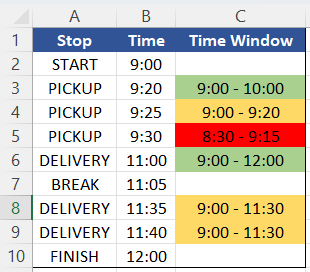
Time windows represent a period of time within which either an order can be serviced or a location is open depending on the context.
Example: a location is open between 6:00–12:00, closed for lunch and open again between 13:00–17:00. It follows this pattern for each working day of the week. Table 7 shows how to represent this using time windows.
{
"dayOfWeek": "WORKDAY",
"start": "06:00",
"finish": "12:00"
},
{
"dayOfWeek": "WORKDAY",
"start": "13:00",
"finish": "17:00"
}
]
| Id | Day of Week | Start | Finish |
| Day | WORKDAYS | 06:00 | 12:00 |
| Day | WORKDAYS | 13:00 | 17:00 |
Note that time windows are merged by the system so that the following are equivalent to the 06:00–12:00 time window above.
| Id | Day of Week | Start | Finish |
| TW 1 | WORKDAYS | 06:00 | 12:00 |
| TW 2 | Monday - Friday | 13:00 | 17:00 |
| TW 3 | Monday - Wednesday | 13:00 | 17:00 |
| TW 3 | Thursday - Friday | 13:00 | 17:00 |
2.21.1 Arrival Only in Time Window
Time windows have two modes of operation. The first ensures that every pickup or delivery occurs within the specified time window. This is the default behaviour. The second is called “Arrival Only in Time Window”. This mode of operation makes it so that the time window is satisfied for each pickup (or delivery) if the time window was satisfied upon the arrival of the vehicle at the location. This second mode of operation is only enabled when Batched Loads is also enabled.